I will be honest with you. When I first came across lovable dev examples on the internet, most of them were toy projects. A weather app here, a simple counter there. Nothing that a real business would actually use or pay for.
So our team decided to run a proper experiment. We picked 10 real problems that real businesses were dealing with and tried to solve each one by building an MVP with Lovable.dev. No shortcuts, no cherry-picking easy wins. Just honest builds with honest results.
This post covers every app we built, the exact prompt we used, the tech stack Lovable generated, and how long the whole thing took.
TL;DR, 10 Apps We Built with Lovable.dev
- Client Onboarding Portal
- SaaS Waitlist Page with Admin Dashboard
- Invoice Generator for Freelancers
- Internal HR Leave Tracker
- AI-Powered Blog Brief Generator
- Restaurant Menu QR App
- Feedback Collection Widget
- Real Estate Lead Capture Tool
- Subscription Tracker Dashboard
- MVP Scope Calculator
Want to build your first AI-powered MVP?
Share your startup idea and key features. Our team will help you turn it into a working MVP using modern AI development tools and scalable architecture.
What is Lovable.dev and Why Are Founders Using It?
- Lovable.dev is a full-stack AI app builder. You write what you want in plain English, and it generates a working React application with a real database, authentication, and a live URL you can share within minutes.
- The idea behind it is called vibe coding. Instead of writing functions and debugging queries, you describe the experience you want your user to have. The AI handles the implementation. It sounds too good to be true until you actually use it.
- What separates Lovable.dev from other tools is that it generates code you actually own. It pushes everything to a GitHub repository. If you ever want a developer to take over, they can open the codebase and work on it directly. No platform lock-in, no proprietary format.
- The native Supabase integration handles your database, user authentication, and file storage. For most MVPs, you never need to set up a backend manually.
Who Gets the Most Value from Lovable.dev?
- Founders who are trying to validate an idea before spending serious money on development get the most out of this tool. Instead of paying a developer $30,000 to build something users might not even want, you can put a working product in front of people for a fraction of that cost. how much does MVP development cost
- Non-technical founders who have been stuck waiting for a technical co-founder can finally move forward on their own. The barrier between idea and working product is now a well-written prompt, not a computer science degree.
- Agencies and freelancers use Lovable.dev to turn around internal tools and client dashboards in days instead of weeks. Developers use it to skip the boilerplate and get straight to the parts that actually require their skills.
- If you are building a complex real-time system with custom algorithms or enterprise-level integrations, Lovable.dev is a starting point, not your complete solution. We will cover where it falls short later in this post.
Have an idea but not sure how to build it?
We help founders validate startup ideas, scope the right MVP features, and launch production-ready products without wasting months on the wrong build.
Lovable.dev Pricing: What You Actually Pay
- Lovable.dev works on a credit-based system. The free plan gives you enough credits to experiment and test small ideas. Paid plans start at around $20 per month and go up based on how much you build.
- Each prompt consumes credits. Simple prompts use fewer credits, complex ones use more. For a founder building a single MVP, the Starter plan covers you comfortably. For agencies running multiple projects at the same time, the higher tiers make more sense.
- The economics are hard to argue with. We built all 10 apps in this post for under $100 in subscription fees. The equivalent developer cost would have been between $7,600 and $14,400. MVP development cost breakdown
How to Start Building with Lovable.dev
- Step 1: Create your account at lovable.dev and connect your GitHub profile. Lovable automatically pushes your code to a repository so you always have a backup and can hand it off to a developer later.
- Step 2: Set up Supabase. Create a free project at supabase.com and connect it to Lovable from the settings panel. This gives you a production-ready database and authentication system from your very first prompt.
- Step 3: Write your first prompt. Be specific. The biggest mistake new users make is writing vague prompts like "build me a CRM." Instead write something like "build me a CRM where I can add contacts with name, email, company, and status. Show all contacts in a searchable table. Let me click any contact to view their details and add notes."
- Step 4: Iterate. Your first output will be 70 to 80 percent of what you want. Use follow-up prompts to fix individual things one at a time. Stacking five changes into one prompt creates confusion and inconsistent results.
- Step 5: Publish. One click gives you a live URL. You can connect a custom domain from the settings panel whenever you are ready.
Want to launch your MVP faster?
Our development team helps founders go from idea to working product quickly using AI tools, modern frameworks, and scalable architecture.
Apps Built with Lovable: The Full Breakdown
App 1: Client Onboarding Portal
- The Problem: A digital agency was running their entire client onboarding process over WhatsApp. Details got lost in long threads, follow-ups were manual, and every new client cost the team 3 to 4 hours of admin work before any actual project work began.
- The Prompt We Used: "Build a client onboarding portal where new clients fill a form with their business name, project goals, budget range, and preferred contact time. Store all responses in Supabase. Build an admin dashboard where the team can see all submissions in a table, mark them as reviewed, and filter by status."
- Tech Stack Generated: Supabase, React, Tailwind CSS
- Time to Build: 2 hours 20 minutes
- What Happened: The form worked on the first attempt. The admin dashboard needed two prompt iterations to get the column layout right and add the status filter. By the end of the same day the agency had it live with a custom domain. They told us it saved 3 hours per client from the very first onboarding they ran through it.
App 2: SaaS Waitlist Page with Admin Dashboard
- The Problem: A founder building a project management tool for remote teams needed a waitlist page before his product was ready. He wanted to capture emails and be able to export his signup list whenever he wanted.
- The Prompt We Used: "Create a waitlist landing page with a headline, a three-bullet value proposition, an email input field, and a submit button. Store emails in Supabase with a timestamp. Build a password-protected admin page at admin where I can view all signups in a table sorted by date and export them to CSV."
- Tech Stack Generated: Supabase, React, Tailwind CSS, CSV export function
- Time to Build: 45 minutes
- What Happened: This is one of the cleanest vibe coding examples we have run. One main prompt, one small follow-up about the button style, and it was done. The founder collected 340 signups before his product launched and used that list to run his first beta.
App 3: Invoice Generator for Freelancers
- The Problem: A freelance UI designer was spending 30 minutes every month manually building invoices in Google Docs. The formatting kept breaking when she converted them to PDF and clients were constantly asking for cleaner versions.
- The Prompt We Used: "Build an invoice generator where I can enter my business name and logo, client name and email, project name, multiple line items with descriptions and rates, a tax percentage, and a due date. Auto-calculate subtotal and total. Let me preview the invoice and download it as a clean PDF."
- Tech Stack Generated: React, jsPDF library, Tailwind CSS
- Time to Build: 1 hour 50 minutes
- What Happened: Getting the PDF margins and font sizing right took three prompt iterations. The final result looked genuinely professional. This is one of the real apps built with AI in this list that directly replaced a paid tool and saves meaningful time every single week.
App 4: Internal HR Leave Tracker
- The Problem: A 12-person startup website was managing all leave requests through a shared Google Sheet. Conflicts were happening regularly because two team members would both approve leave for the same week without realizing they were the only two people who could cover a critical function.
- The Prompt We Used: "Build an internal leave tracker. Employees log in with their email and can submit leave requests with start date, end date, and leave type (sick, casual, or earned). Managers see a dashboard with a calendar view showing all pending and approved requests color-coded by type. Managers can approve or reject requests from the dashboard."
- Tech Stack Generated: Supabase, React, Tailwind CSS, calendar UI component
- Time to Build: 3 hours 40 minutes
- What Happened: This was our most complex build in the entire experiment. The calendar component needed the most iterations. We also had to prompt Lovable twice to fix a bug where overlapping date ranges were not being flagged correctly. After five prompt rounds it worked exactly as intended. The team adopted it within a week and permanently deleted the Google Sheet.
App 5: AI-Powered Blog Brief Generator
- The Problem: A content agency with 6 writers was spending 45 minutes per brief manually pulling competitor angles, writing outline structures, and formatting everything into a consistent template before handing work to writers.
- The Prompt We Used: "Build a blog brief generator. I enter a topic and a target keyword. The app sends both to the OpenAI API and returns a structured brief containing a recommended title, meta description, five H2 subheadings with short descriptions, a target word count, and three competitor content angles to beat. Save each brief to Supabase so I can view my brief history."
- Tech Stack Generated: React, OpenAI API, Tailwind CSS, Supabase
- Time to Build: 2 hours 10 minutes
- What Happened: Brief generation dropped from 45 minutes to under 3 minutes per brief. This is easily one of our favourite apps built with lovable because it replaced a bottleneck that was directly limiting how many clients the agency could take on. After using it for one month they took on two additional clients without hiring a new writer. AI tools that save time for content teams
App 6: Restaurant Menu QR App
- The Problem: A restaurant owner was reprinting physical menus almost every month because prices changed, dishes rotated seasonally, and items sold out. Each reprint cost money and time.
- The Prompt We Used: "Build a digital menu management app. The restaurant owner logs into an admin panel and can create menu categories, add dishes with names, descriptions, prices, and photos, and toggle items as available or unavailable. The customer-facing menu is a clean mobile-first page accessible through a generated QR code."
- Tech Stack Generated: Supabase, React, Tailwind CSS, QR code generator library
- Time to Build: 2 hours 55 minutes
- What Happened: The mobile card layout needed two rounds of prompting to look clean on smaller screens. The QR code generation worked immediately. The owner printed one sticker per table and has not spent a single rupee on menu reprints since. Every price change now takes two minutes in the admin panel.
App 7: Feedback Collection Widget
- The Problem: A SaaS founder wanted to collect user feedback after key actions inside his product without paying $49 per month for a dedicated feedback tool he was only going to use for one small feature.
- The Prompt We Used: "Build an embeddable feedback widget. When triggered it shows a popup with a 1 to 5 star rating selector and an optional text comment box. On submission it stores the rating, comment, timestamp, and current page URL in Supabase. Generate a JavaScript embed snippet I can drop into any website with a single script tag."
- Tech Stack Generated: Vanilla JavaScript, Supabase, minimal CSS
- Time to Build: 1 hour 30 minutes
- What Happened: Lovable generated a clean embed snippet that worked on three completely different websites without any modification. This is one of the real apps built with AI in this list that genuinely surprised us with how clean the output was. It replaced a paid tool entirely.
App 8: Real Estate Lead Capture Tool
- The Problem: A real estate agent was running Facebook ads to a generic contact page with a single long form. People were dropping off before completing it because the form asked for too much information upfront.
- The Prompt We Used: "Build a two-step lead capture page for real estate. On step one the user selects the type of property they are looking for from a visual option selector. On step two they enter their name, phone number, and email address. Store each lead in Supabase with a timestamp and their property preference. Send an instant email notification to the agent when a new lead submits."
- Tech Stack Generated: Supabase, React, Tailwind CSS, Resend
- Time to Build: 2 hours 15 minutes
- What Happened: The agent ran the same Facebook ad campaign to both pages and tracked completions for four weeks. The two-step page produced 40 percent more completed leads than the original contact form. If you want to build an MVP with Lovable dev for any client-facing lead generation use case, this two-step format consistently outperforms a single long form conversion rate optimisation for landing pages.
App 9: Subscription Tracker Dashboard
- The Problem: A founder had accumulated 22 active SaaS subscriptions over two years with no visibility into total monthly spend, which tools he was actually using, or which renewals were coming up.
- The Prompt We Used: "Build a personal subscription tracker. I can add subscriptions with the service name, monthly or annual cost, billing cycle, renewal date, and category (productivity, marketing, development, design, other). Show a dashboard with my total monthly spend, a list of renewals coming up in the next 30 days, and a bar chart showing spend broken down by category."
- Tech Stack Generated: Supabase, React, Recharts, Tailwind CSS
- Time to Build: 1 hour 45 minutes
- What Happened: Lovable pulled in Recharts without being asked and built a spend breakdown chart that looked genuinely polished. This is one of those vibe coding examples where the AI made a better design decision than what we had in mind. The founder discovered he was paying for four tools he had not used in six months and cancelled them immediately.
App 10: MVP Scope Calculator
- The Problem: Our own team was spending 30 to 45 minutes per potential client manually estimating project scope before any formal conversation had even started.
- The Prompt We Used: "Build an MVP scope calculator. Users select features from a categorised checklist including user authentication, payment processing, admin dashboard, third-party API integrations, AI features, real-time notifications, and multi-language support. Based on their selections the calculator displays an estimated cost range, a recommended timeline, and a complexity rating. Show a summary card at the end with a CTA button to book a consultation call. Log each calculator session in Supabase."
- Tech Stack Generated: React, Tailwind CSS, Supabase
- Time to Build: 2 hours 30 minutes
- What Happened: This tool now lives on our website and has become one of our most effective lead generation assets. Every founder who completes it arrives at a consultation already understanding roughly what their build will cost. Conversations are faster, expectations are aligned, and our close rate on these leads is significantly higher.
Need help building a real production MVP?
Lovable is great for fast validation. When you're ready to scale, our engineers build production-grade SaaS and AI applications used by real businesses.
How Gaincafe Uses Lovable.dev to Ship Faster
At Gaincafe, we use Lovable.dev as a rapid prototyping and MVP acceleration tool. Instead of starting every project from scratch, our team uses AI-assisted development to quickly generate working interfaces, test product ideas, and validate business workflows before scaling them into full production systems.
1. SignatureForms AI
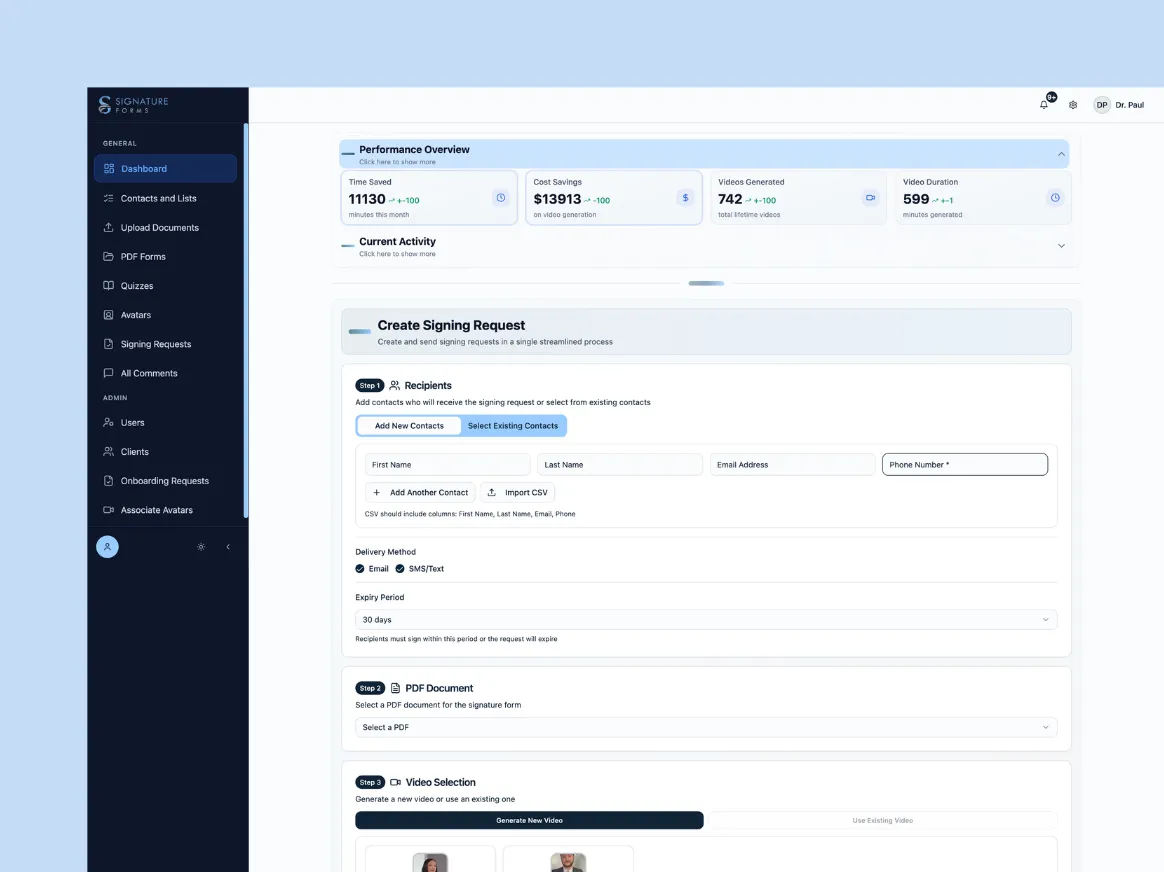
SignatureForms AI is a workflow automation platform that helps businesses collect digital signatures and structured form submissions through a clean, modern dashboard. The system allows users to create smart forms, manage submissions, and automate document workflows without complex setup. Our team helped streamline the product experience and ship the dashboard quickly using AI-assisted development tools.
2. IVF Dekho
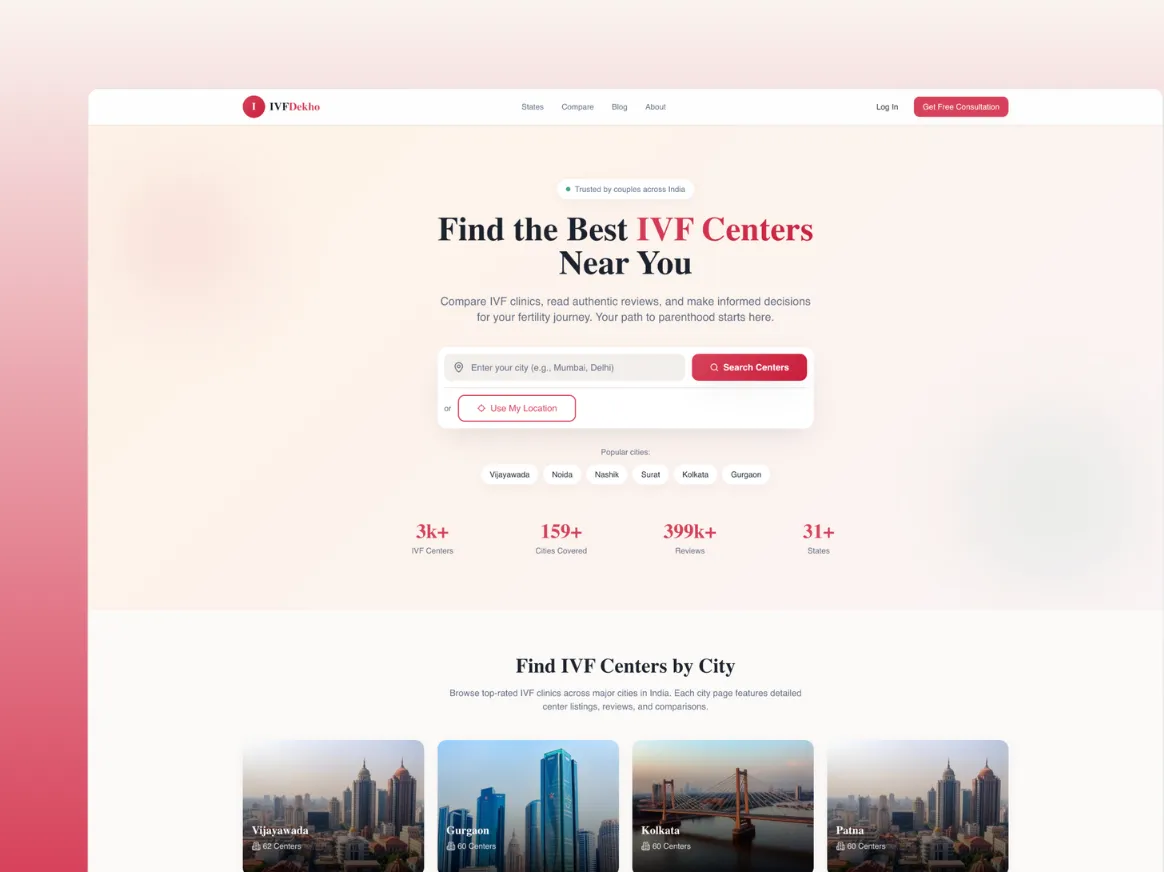
IVF Dekho is a healthcare discovery platform that helps patients find IVF clinics, fertility specialists, and treatment information across India. The platform focuses on simplifying the process of comparing clinics, understanding treatment options, and connecting patients with the right fertility centres. Our team helped deliver a clean and user-friendly interface that makes it easier for patients to explore clinics, read information, and take the next step toward treatment.
3. Dripoma
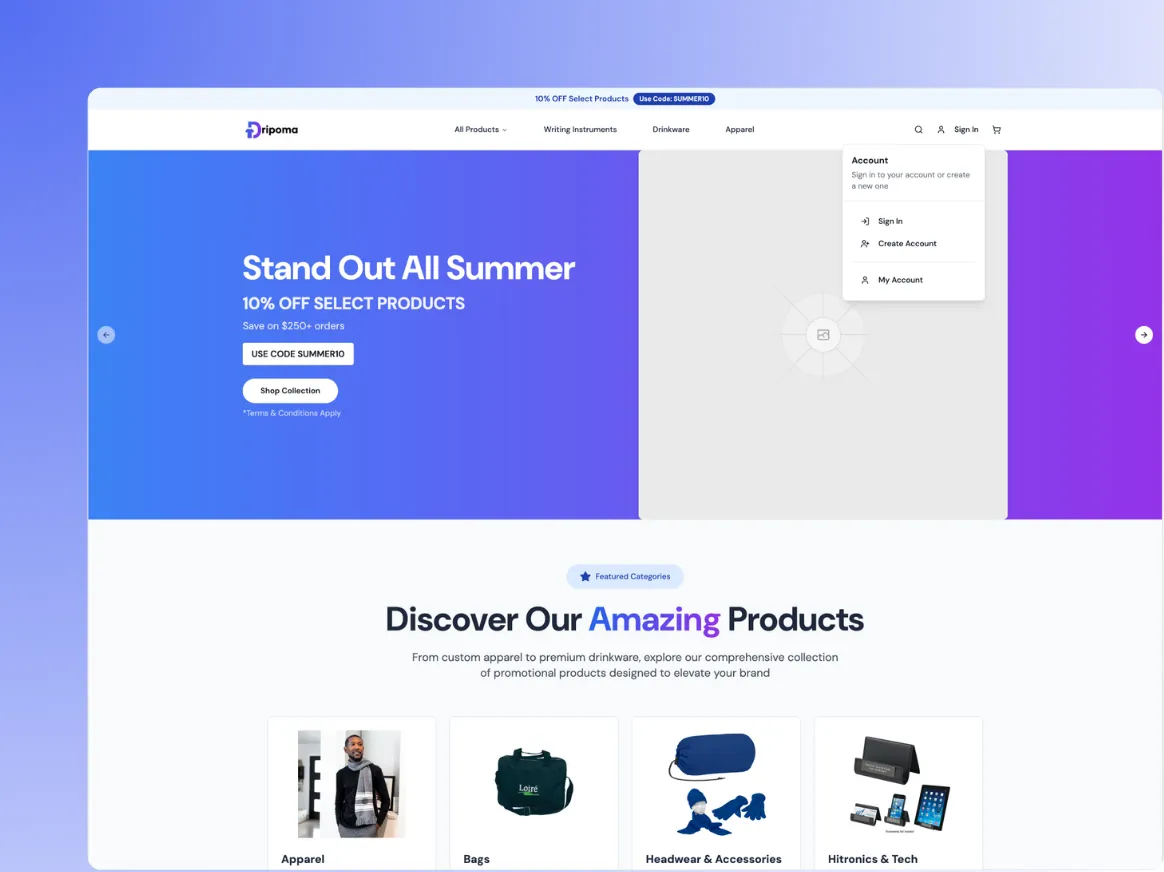
Dripoma is a modern eCommerce platform built around specialty coffee products. The site combines a clean product browsing experience with a strong brand identity and optimized checkout flow. Our team helped ship key product pages and customer-facing components quickly using AI-assisted UI development techniques, allowing the brand to launch faster while maintaining design quality.
4. Restaurant Management System
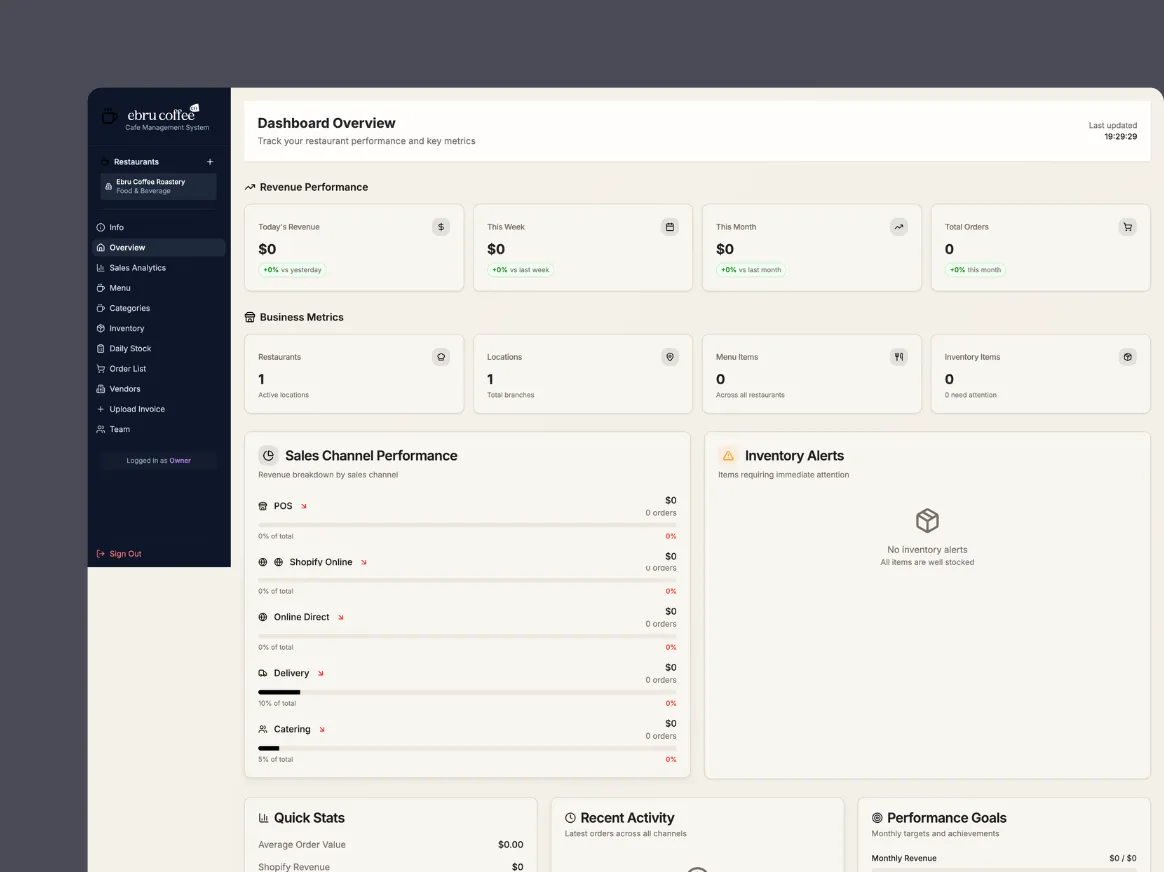
The Ebru Coffee Co platform includes a custom dashboard for managing products, inventory, and orders for the coffee brand's online store. By combining modern frontend frameworks with rapid prototyping tools, we helped deliver an interface that allows the team to manage operations efficiently while providing a seamless shopping experience for customers.
5. Rahvaraamat
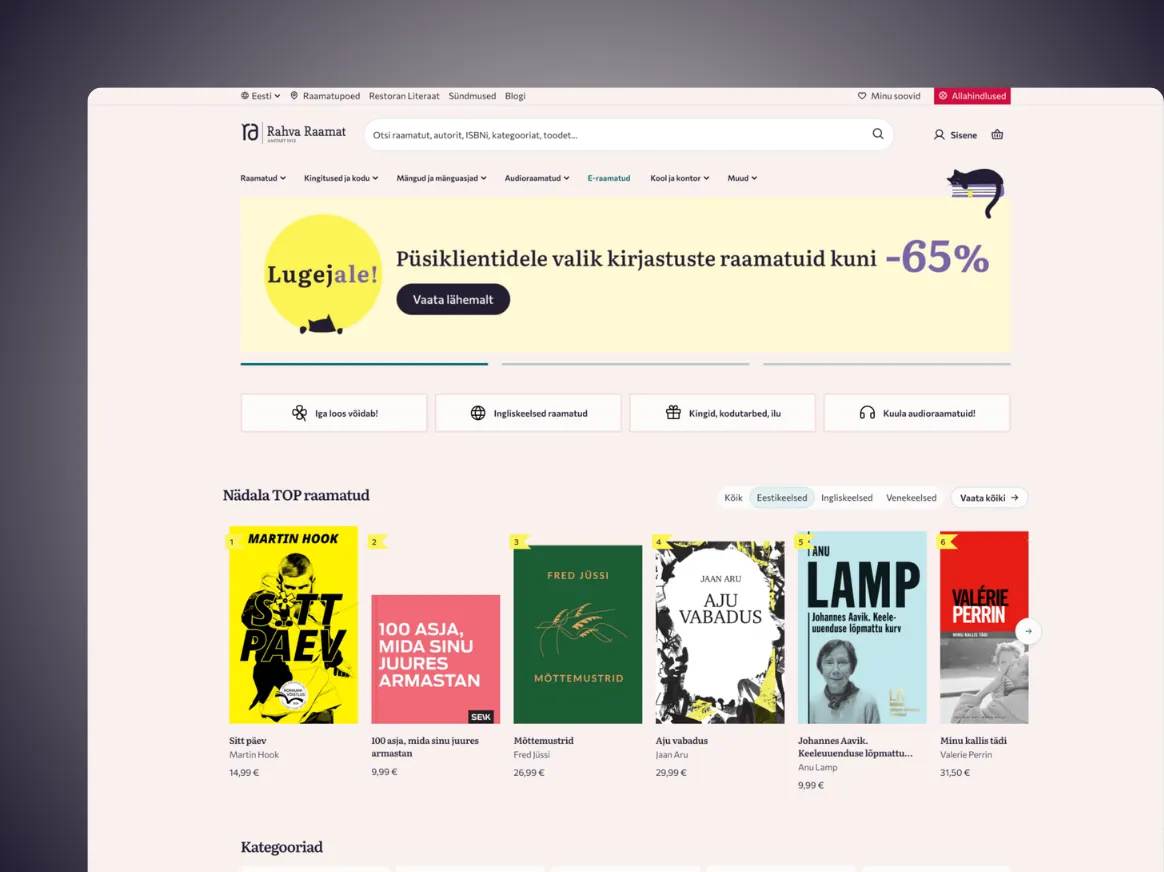
Rahvaraamat is a digital platform connected to one of Estonia's most well-known bookstore brands. Our work focused on improving parts of the user experience and ensuring the platform could support modern online commerce workflows. AI-assisted development tools helped accelerate parts of the build process while keeping the architecture ready for long-term scalability.
The 5 Types of Apps Lovable.dev Builds Best
After building these 10 apps and dozens more for clients, the pattern of where Lovable.dev genuinely excels has become very clear.
- Form-heavy tools come out clean almost every time. Multi-step forms, validation logic, database submission, confirmation emails. Lovable handles all of it reliably without needing many iterations.
- Admin dashboards with tables, filters, and basic CRUD operations are where Lovable is at its strongest. If your core use case is viewing, adding, editing, and deleting records in a clean interface, expect a very solid first output.
- Waitlist and lead capture pages are the fastest builds of all. A well-written prompt can produce a complete page with email capture, database storage, and an admin view in under an hour.
- Internal business tools like trackers, calculators, and simple reporting dashboards work well because the logic is predictable and the UI requirements are straightforward.
- Early-stage SaaS MVPs with a core user journey of three to five screens are very achievable. Authentication, a main dashboard, the core feature, and a settings page is a pattern Lovable handles confidently and consistently.
Where Lovable.dev Struggles
Being honest about the limitations matters more than overselling the tool.
- Real-time features like live chat, collaborative editing, and live data feeds are genuinely difficult. Lovable can generate the structural code but the synchronisation logic often has bugs that require multiple rounds of prompting and sometimes manual fixes.
- Complex conditional UI with many branching states across screens gets messy quickly. The more your app needs to behave differently based on user context or previous actions, the more iterations you will need.
- Pixel-perfect brand design is hit or miss. Lovable generates clean functional UI using Tailwind but matching an exact Figma design takes a lot of back-and-forth prompting.
- Enterprise-grade architecture with microservices, custom APIs, or complex third-party integrations is beyond what Lovable is designed for. At that level, a proper development team is the right investment. when to hire a development agency for your MVP
Ready to scale beyond AI builders?
When your MVP needs real scalability, custom infrastructure, or enterprise integrations, our development team can take your product to the next stage.
Lovable.dev vs Other AI App Builders
- Lovable.dev vs Bolt.new: Bolt is faster for very quick throwaway prototypes but the output is less structured. For anything you plan to actually ship and grow, Lovable produces more maintainable code.
- Lovable.dev vs Cursor: Completely different tools. Cursor helps developers write code faster but you still need to know how to code. Lovable is for people who want a working app without writing any code at all.
- Lovable.dev vs Bubble: Bubble locks your app into its own infrastructure. Lovable generates real React code you own completely and can move anywhere. If code ownership matters to you, Lovable wins clearly.
- Lovable.dev vs Webflow: Webflow is built for websites and marketing pages. Lovable is built for applications with user accounts, databases, and business logic. Different tools for different jobs.
How to Write Prompts That Get Better Results
- Describe what the user does, not what the feature is. Instead of "add a notifications system," write "when a new order is placed, send the logged-in user an in-app notification showing the order number and total, and mark it as read when they click on it."
- Name every data field before you start. Tell Lovable exactly what gets stored in the database. This prevents you from needing to restructure your data model later.
- One change per prompt. Do not send Lovable a list of five things to fix at once. Make one change, verify it works, then move to the next.
- Tell it what to keep. When making changes, start your prompt with "keep everything exactly as it is but..." This prevents Lovable from regenerating sections that were already working correctly.
- Ask for mobile-first layouts. Lovable defaults to desktop unless you specify otherwise. Adding "make sure this looks good on screens as small as 375px wide" to any UI-related prompt saves you a separate iteration later.
Need help scaling your MVP?
Our engineers help startups optimise architecture, scale infrastructure, and turn early MVPs into reliable production platforms.
After Lovable: How to Scale Your MVP
Lovable.dev gets you to your first version fast. But once your product starts getting real traction, the path forward needs some planning.
- When you hit 500 to 1,000 active users, audit your Supabase database structure. Lovable does not always generate optimal database indexes for high-traffic queries. A developer can review the schema in an afternoon and prevent performance issues before they become user-facing problems.
- When your feature list outgrows what you can manage through prompting alone, bring in a developer to work directly in the codebase. Because Lovable generates real React code, any developer can open the repository and start working without rebuilding anything from scratch.
- When you need compliance, enterprise integrations, or custom infrastructure, you are at the point where a dedicated development team creates more value than an AI builder. Use your traction and revenue to justify that investment. hiring an MVP development team
The smart path is to use Lovable.dev to validate your assumptions and get your first paying users. Then use that proof to fund building version two properly.
Total Time and Cost Across All 10 Apps
| App | Time to Build | Developer Cost Equivalent |
|---|---|---|
| Client Onboarding Portal | 2 hrs 20 min | $800 to $1,500 |
| SaaS Waitlist Page | 45 min | $300 to $600 |
| Invoice Generator | 1 hr 50 min | $600 to $1,200 |
| HR Leave Tracker | 3 hrs 40 min | $1,500 to $3,000 |
| Blog Brief Generator | 2 hrs 10 min | $800 to $1,500 |
| Restaurant Menu QR App | 2 hrs 55 min | $1,000 to $2,000 |
| Feedback Widget | 1 hr 30 min | $500 to $900 |
| Real Estate Lead Tool | 2 hrs 15 min | $700 to $1,200 |
| Subscription Tracker | 1 hr 45 min | $600 to $1,000 |
| MVP Scope Calculator | 2 hrs 30 min | $800 to $1,500 |
| Total | 21 hrs 40 min | $7,600 to $14,400 |
Total Lovable.dev subscription cost to build all 10 apps: under $100.
What We Learned
- Specific prompts produce specific apps. Every extra sentence you add to your prompt is time you save in iteration.
- The Supabase integration is the strongest part of the platform. We used it in nine out of ten builds and never had to touch the database configuration manually.
- Build an MVP with Lovable dev when you need to validate fast and budget is limited. Bring in a proper development team when you need to scale, customise deeply, or meet compliance requirements. These are not competing options. They are sequential steps in the same journey.
- The 10 apps in this post are all live. None of them are demos. Every single one is solving a real problem for a real business right now. That is the clearest proof I can give you that these lovable dev examples represent what the tool can genuinely do in the right hands.
What App Do You Want to Build Next?
If you have been sitting on an idea and waiting for the right time, this is it. The barrier to building real apps built with AI has never been lower and it is only getting lower.
Drop a comment below and tell us what you want to build. If you need help taking your MVP beyond what Lovable.dev can handle and turning it into a production-grade product, our team works with founders at exactly that stage.
Ready to build your product?
Tell us your idea and we’ll help you design the right MVP, choose the best tech stack, and launch your product faster.